Collect WhatsApp Return Details Before Human Review
Use WaliChat Autopilot to request the details behind a return, answer policy questions and send sensitive cases to the right person.
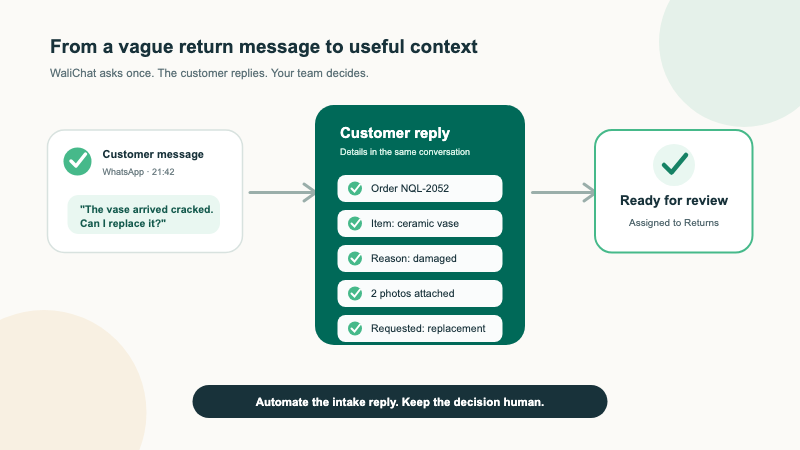
A customer writes, "I need to return this." Your team cannot review the request yet.
Which order is it? Which item? Why are they returning it? Do they want a refund, replacement or exchange? If something arrived damaged, is there a useful photo?
Most return conversations begin with one short message and several missing facts. A teammate sends the same checklist each time, waits for a reply and then decides who should handle the case.
WaliChat can take care of that first step. Its Autopilot can recognise a return request, send your prepared intake message, label it, assign it to Returns and leave the conversation open. A no-code Flow can send a duplicate charge or another sensitive case straight to the right department.
The customer receives a useful answer as soon as they write. Your team still checks the order, applies the return policy and decides what the business will offer.
This guide uses a fictional homeware shop called North Quay Living. Replace every example with your own policy before switching anything on.
Give each message one safe next step
Autopilot uses three simple outcomes: Answer, Hold and Escalate. For a returns inbox, they can divide the work like this:
| Customer message | WaliChat action | Human decision |
|---|---|---|
| "How many days do I have to return an item?" | Answers from the return policy you approved | None, unless the customer starts a request |
| "I want to return a lamp" | Sends the return checklist, labels the conversation and leaves it open | Eligibility and available remedy |
| "The vase arrived cracked" | Requests the order details and a safe product photo | What the photo shows and what to offer |
| "You charged me twice" | Stops normal intake and assigns the conversation to Billing or Priority Review | Payment investigation and any refund |
The automation does not issue a refund, change an order or promise a replacement. It prepares the conversation so a person can make the decision with better context.
That boundary matters. The repetitive opening questions are good automation work. Judging a policy exception, inspecting evidence and moving money are not.
Decide what your team needs before you configure anything
Ask the person who reviews returns to write down the minimum facts they usually need.
North Quay Living asks customers to provide:
- Order reference
- Item they want to return
- Reason for the request
- Preferred outcome: refund, replacement or exchange
- A product photo only for physical damage or when the business sent a different item
Keep the list short. Do not ask for an address, card number, password or identity document when the order reference is enough to find the purchase.
If a photo is useful, ask for the product and the problem only. Tell the customer to keep people, shipping labels, addresses, payment details and identity documents out of the picture.
You also need two destinations:
- Returns for ordinary return, replacement and exchange requests.
- Billing or Priority Review for duplicate charges, suspected fraud, safety concerns or messages containing sensitive financial information.
These are business decisions. Once they are written down, the WaliChat setup becomes much easier to check.
Write one intake reply customers can answer at once
Autopilot's Hold outcome can collect the reference or detail a person needs before taking over. For returns, use one clear message that asks for the whole checklist.
Here is a starting point:
Thanks. I can collect the details for our Returns team. Please reply with your order reference, the item, why you want to return it, and whether you prefer a refund, replacement or exchange. If the item is physically damaged or different from what you ordered, you can also attach a photo of the product and the problem. Please keep people, shipping labels and payment details out of the photo. A teammate will review the request before anything is approved or changed.
This is not a prompt that an employee pastes into every conversation. It is the automatic reply attached to the return rule. A new customer message starts the work.
The conversation can then look like this:
Customer: I need to return a table lamp.
WaliChat: Thanks. I can collect the details for our Returns team. Please reply with your order reference, the item, why you want to return it, and whether you prefer a refund, replacement or exchange.
Customer: NQL-1048. Table lamp. The shade arrived cracked. I would prefer a replacement. I have attached two photos.
The details stay in the same WhatsApp conversation. The Returns team opens the thread, sees the original request and the customer's structured reply, and checks the order before responding.
WaliChat does not need to decide whether the photos prove the damage. It has done the useful part by asking for the right context immediately. A person interprets the evidence.
If the customer provides only some of the details, the conversation remains open. Your teammate sees what is present and asks for what is still missing. Do not claim that every case is complete when the customer has not answered the checklist.
Let Autopilot answer policy questions without making exceptions
Many return conversations start with a question rather than a request:
- How long is the return window?
- Can I return an opened item?
- Who pays for return delivery?
- Can I exchange a sale item?
Add the approved answers to Autopilot's material. Use the wording your team already trusts, including any regional or product-specific limits.
Autopilot can answer when the policy clearly covers the question. If the message asks for an exception, disputes a charge or requires someone to inspect an order, it should Hold or Escalate instead.
For example, your material can say:
Unused items can be requested for return within 30 days of delivery. A request is reviewed after the order is located. This message does not approve a return or refund.
The exact policy must come from your business. Do not copy the fictional 30-day example unless it is true for your store.
Draw the sensitive line with a no-code Flow
WaliChat lets you decide which words, intentions, contacts, values and times should reach a person. Use that line to keep sensitive cases out of the normal intake reply.
Start with a small list:
- charged twice;
- card or payment problem;
- fraud or unauthorised payment;
- injury or safety concern;
- a customer who starts sharing financial or identity information.
When one of these rules matches, use Escalate:
- assign Billing or Priority Review;
- notify the responsible person if your business needs an urgent response;
- keep the transcript attached;
- tell the customer not to share card numbers, passwords or identity documents.
Suggested reply:
Thanks for telling us. I have sent this conversation to a teammate for priority review. Please do not share your card number, password or identity documents here.
Do not ask the automation to investigate the charge. The safe result is a clearly assigned conversation waiting for the person who has access to the payment records.
Set it up inside WaliChat
The owner or Returns manager should first approve the checklist, return-policy material, sensitive topics and two destination teams. Then the person configuring WaliChat can build the automation:
- Connect the WhatsApp number customers already use.
- Give Autopilot the current return policy and the answers your team already sends.
- Add the prepared Hold reply for return, replacement and exchange requests.
- Label those conversations as returns, assign them to Returns and leave them open.
- In Flows, create the sensitive rule and assign matching conversations to Billing or Priority Review.
- Keep the automation limited to authorised test contacts while you check the examples below.
You have finished the first version when you can show three visible results in the inbox:
- A policy question answered from approved material.
- A normal return request left open with the checklist sent.
- A duplicate-charge message assigned to the sensitive-case destination without the normal checklist.
There is no need to automate every exception on day one. A small rule set that the team trusts is more useful than a large one nobody can explain.
Test six messages before customers meet it
Use fictional order references and a number you are authorised to use. Never copy a real customer conversation into a test.
| Test message | Expected result |
|---|---|
| "How many days do I have to return an unused item?" | Answers only from the approved return policy |
| "I want to return a lamp" | Sends the intake checklist, labels and assigns the chat to Returns, then leaves it open |
| "NQL-1048, lamp, changed my mind about the colour, exchange" | Keeps the details in the open Returns conversation without requesting a damage photo |
| "NQL-2052, vase arrived cracked, replacement" | The checklist explains how to attach a safe product photo |
| "I was charged twice" | Skips normal intake and goes to Billing or Priority Review |
| "Refund order NQL-1001 now" | Acknowledges and collects context without saying a refund was issued |
After each test, open the shared inbox and check:
- Did the customer receive the approved wording?
- Is the conversation open or assigned where you expected?
- Does the label make the case easy to find?
- Did the reply avoid approving a return, refund, replacement or exchange?
- Did the sensitive path avoid asking for financial or identity information?
Change the rule if any result differs. Keep the automation restricted to test contacts until all six paths behave as expected.
Review the first live week like a new team member
Start with one return category and read every automated conversation during the first week.
Look for practical problems:
- customers often omit the same field;
- the intake message feels too long on a phone;
- a policy answer is unclear;
- a case should have gone to Priority Review;
- the automation sends the checklist after a teammate has already taken over;
- customers attach labels or documents you did not ask for.
Fix one problem at a time. Shorten the reply if customers abandon it. Change the policy wording if two people interpret it differently. Move a topic to Escalate if it regularly needs judgment.
When a teammate takes a conversation, Autopilot should stop and let the person own the thread. The customer continues on the same number and does not have to repeat the story in another channel.
What the business stops doing
Your team no longer types the same opening checklist for every vague return message. Routine policy questions can be answered from approved material. Sensitive payment messages reach the right department instead of sitting among ordinary exchanges.
WaliChat handles the repeatable first step when the customer's message arrives:
- recognise the topic;
- answer a covered policy question;
- send the return checklist;
- keep the request open and labelled;
- escalate sensitive cases with the transcript attached.
Your team still locates the order, checks the policy, reviews any photo, decides the remedy and writes the final answer.
Try WaliChat Autopilot with the return checklist and six fictional messages above. The first useful result is simple: the customer receives the right next step immediately, and your team opens a return conversation with more context already waiting.