Win Back Lost Sales: Recover Abandoned Shopify Carts on WhatsApp
Bring back customers who leave without paying with an automatic WhatsApp reminder for every abandoned Shopify cart. No code, set it up in an afternoon.
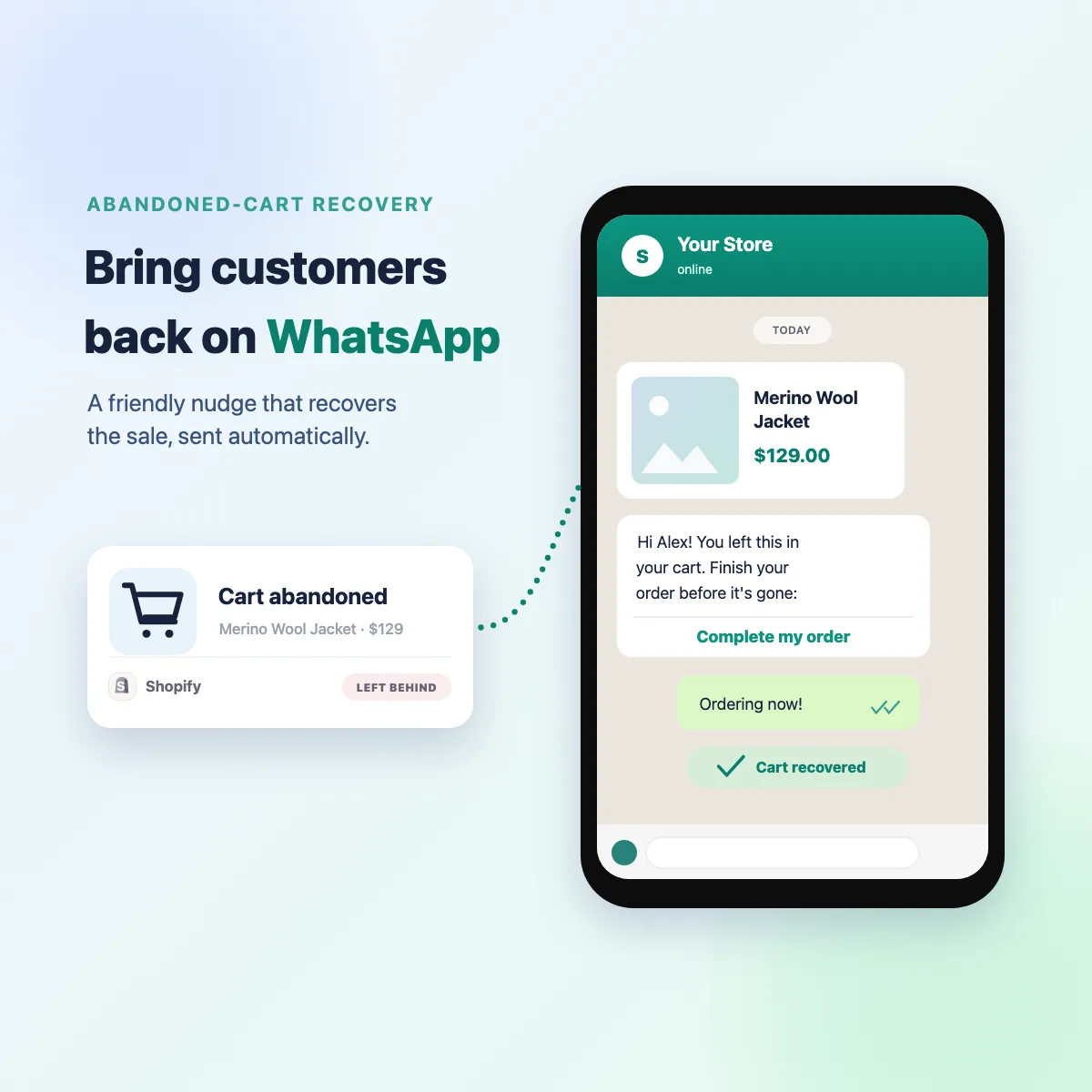
Roughly 7 in 10 customers who add something to their cart leave without paying. Email is what most stores reach for to win them back, and most emails are never opened. WhatsApp is different: almost every message gets read, usually within minutes. So a short, friendly nudge like "Hi Alex, you left the Merino Wool Jacket behind. Here's your link to finish." brings a real share of those customers back.
Best of all, you can set this up yourself. No code, no developer, no technical knowledge. Wali is the easiest way to automate WhatsApp for your business, and this guide walks you through the exact path that takes you from start to your first recovered sale.
What you're setting up
When a customer leaves your Shopify store mid-checkout, they automatically receive a WhatsApp message with their name, the product they left behind, and a link straight back to the checkout. Still no purchase? An optional message the next day adds a small coupon. That's the whole thing. Once it's on, it runs by itself.
You connect three things, one time:
- Every Shopify plan already detects abandoned carts for you.
- Automating and sending your WhatsApp messages falls to Wali, the easiest no-code way to do it.
- Behind it all, your WhatsApp number runs on the official WhatsApp Business API.
Here's how, step by step.
Wali does the recovering, sending the reminder, waiting, following up and closing the sale. Shopify can't send WhatsApp itself, so its only job is to tell Wali the moment a cart is abandoned. Think of Shopify as the doorbell and Wali as the salesperson.
Step 1 · Create your Wali account
Go to app.wali.chat/register and sign up. It takes a minute.
Step 2 · Connect your WhatsApp number
Inside Wali, connect your number on the official WhatsApp Business API (powered by Meta). Wali guides you through registering the number with Meta. You can use a brand-new number or bring your existing business one.
Step 3 · Create your reminder message
For reminders like this, WhatsApp asks businesses to use an approved message template, a Meta rule that keeps the platform free of spam. In Wali, create a simple template with three blanks for the customer's name, the product, and the recovery link, then submit it. Approval usually takes up to 24 hours. Already have one? Skip ahead.
Two simple rules keep you on the right side of the line:
- Only message customers who gave you permission (add a WhatsApp opt-in at checkout).
- Always stop messaging anyone who replies STOP.
Step 4 · Build your recovery flow in Wali
In Wali, open Flows and create your recovery flow (it's included from the Business plan and up). The flow checks that the customer left a phone number, sends the reminder, waits a day, and sends a follow-up with a coupon. It looks like this:
You don't build it from a blank canvas. The editor lets you drop these steps in with a few clicks.
Want a head start? Import this ready-made flow into the editor, then set your API key, device, and template names:
{
  "name": "WhatsApp abandoned-cart recovery",
  "nodes": [
    { "parameters": { "httpMethod": "POST", "path": "abandoned-cart", "responseMode": "onReceived", "options": {} },
      "id": "a1", "name": "Abandoned cart", "type": "n8n-nodes-base.webhook", "typeVersion": 2, "position": [260, 300], "webhookId": "abandoned-cart" },
    { "parameters": { "conditions": { "options": { "caseSensitive": true, "leftValue": "", "typeValidation": "loose", "version": 2 }, "conditions": [ { "id": "c1a2b3", "leftValue": "={{ $json.body.phone }}", "rightValue": "", "operator": { "type": "string", "operation": "notEmpty", "singleValue": true } } ], "combinator": "and" }, "options": {} },
      "id": "a2", "name": "Has phone?", "type": "n8n-nodes-base.if", "typeVersion": 2.2, "position": [480, 300] },
    { "parameters": { "method": "POST", "url": "https://api.your-domain.com/v1/messages", "sendHeaders": true, "headerParameters": { "parameters": [ { "name": "Token", "value": "YOUR_API_KEY" }, { "name": "Content-Type", "value": "application/json" } ] }, "sendBody": true, "specifyBody": "json", "jsonBody": "={ \"device\": \"YOUR_DEVICE_ID\", \"phone\": \"{{ $('Abandoned cart').item.json.body.phone }}\", \"template\": { \"name\": \"abandoned_checkout_reminder\", \"language\": \"en\", \"components\": [ { \"type\": \"body\", \"parameters\": [ { \"type\": \"text\", \"text\": \"{{ $('Abandoned cart').item.json.body.first_name }}\" }, { \"type\": \"text\", \"text\": \"{{ $('Abandoned cart').item.json.body.product }}\" }, { \"type\": \"text\", \"text\": \"{{ $('Abandoned cart').item.json.body.recovery_url }}\" } ] } ] } }", "options": {} },
      "id": "a3", "name": "Send reminder", "type": "n8n-nodes-base.httpRequest", "typeVersion": 4.2, "position": [720, 300] },
    { "parameters": { "amount": 24, "unit": "hours", "resume": "timeInterval" },
      "id": "a4", "name": "Wait 24 hours", "type": "n8n-nodes-base.wait", "typeVersion": 1, "position": [940, 300], "webhookId": "wait-24h" },
    { "parameters": { "method": "POST", "url": "https://api.your-domain.com/v1/messages", "sendHeaders": true, "headerParameters": { "parameters": [ { "name": "Token", "value": "YOUR_API_KEY" }, { "name": "Content-Type", "value": "application/json" } ] }, "sendBody": true, "specifyBody": "json", "jsonBody": "={ \"device\": \"YOUR_DEVICE_ID\", \"phone\": \"{{ $('Abandoned cart').item.json.body.phone }}\", \"template\": { \"name\": \"abandoned_checkout_reminder_coupon\", \"language\": \"en\", \"components\": [ { \"type\": \"body\", \"parameters\": [ { \"type\": \"text\", \"text\": \"{{ $('Abandoned cart').item.json.body.first_name }}\" }, { \"type\": \"text\", \"text\": \"{{ $('Abandoned cart').item.json.body.product }}\" }, { \"type\": \"text\", \"text\": \"{{ $('Abandoned cart').item.json.body.recovery_url }}\" } ] } ] } }", "options": {} },
      "id": "a5", "name": "Send reminder + coupon", "type": "n8n-nodes-base.httpRequest", "typeVersion": 4.2, "position": [1160, 300] }
  ],
  "connections": {
    "Abandoned cart": { "main": [[{ "node": "Has phone?", "type": "main", "index": 0 }]] },
    "Has phone?": { "main": [[{ "node": "Send reminder", "type": "main", "index": 0 }], []] },
    "Send reminder": { "main": [[{ "node": "Wait 24 hours", "type": "main", "index": 0 }]] },
    "Wait 24 hours": { "main": [[{ "node": "Send reminder + coupon", "type": "main", "index": 0 }]] }
  },
  "active": false, "settings": { "executionOrder": "v1" }, "pinData": {}
}
Now copy your webhook URL, which is the single link connecting Shopify to Wali:
- Open the flow's first node, Abandoned cart (it's a webhook).
- Copy its URL, the address Shopify posts each abandoned cart to.
- Keep it for the next step, where you paste it into Shopify.
Step 5 · Connect Shopify (it just signals Wali)
Because Shopify Flow can't send WhatsApp, its only job is to ping Wali the moment a cart is abandoned. The link between them is one URL: Shopify Flow → (sends the cart data) → your Wali webhook → Wali sends the WhatsApp. Set it up once:
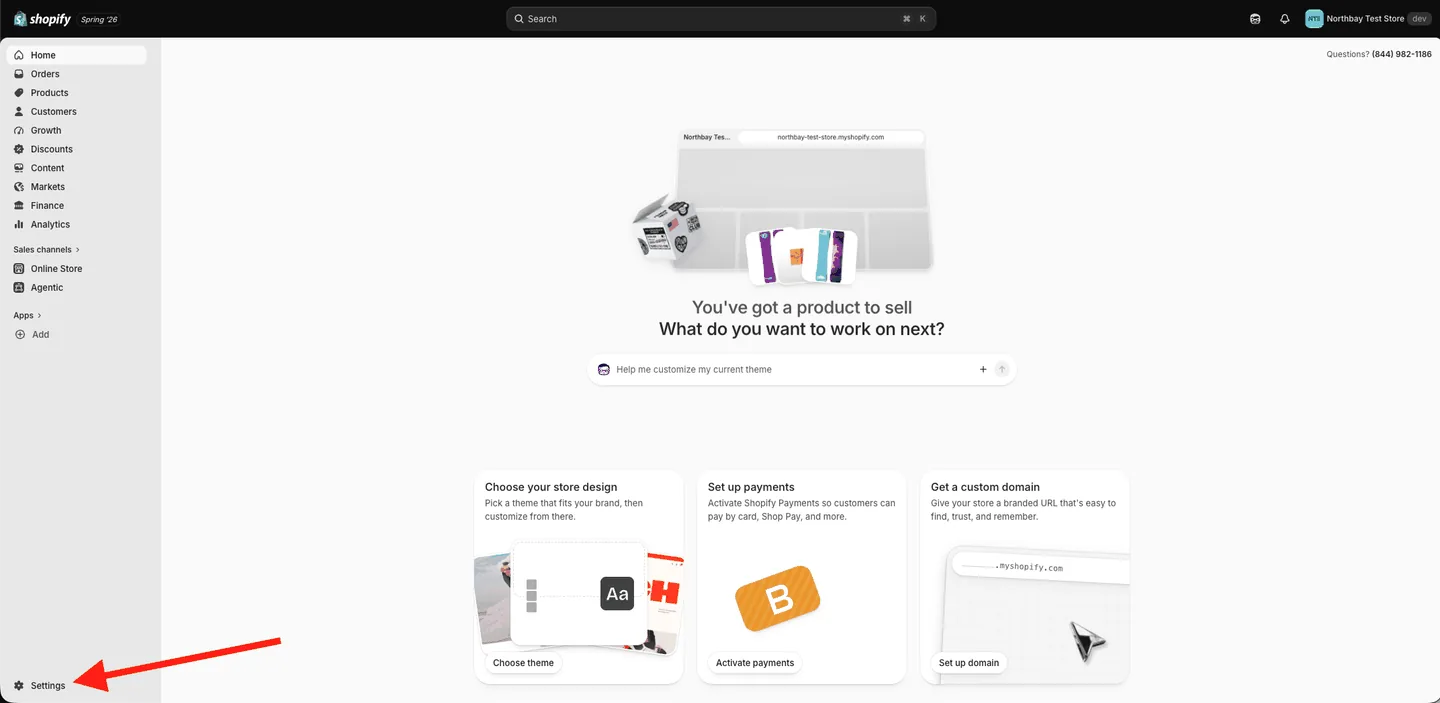
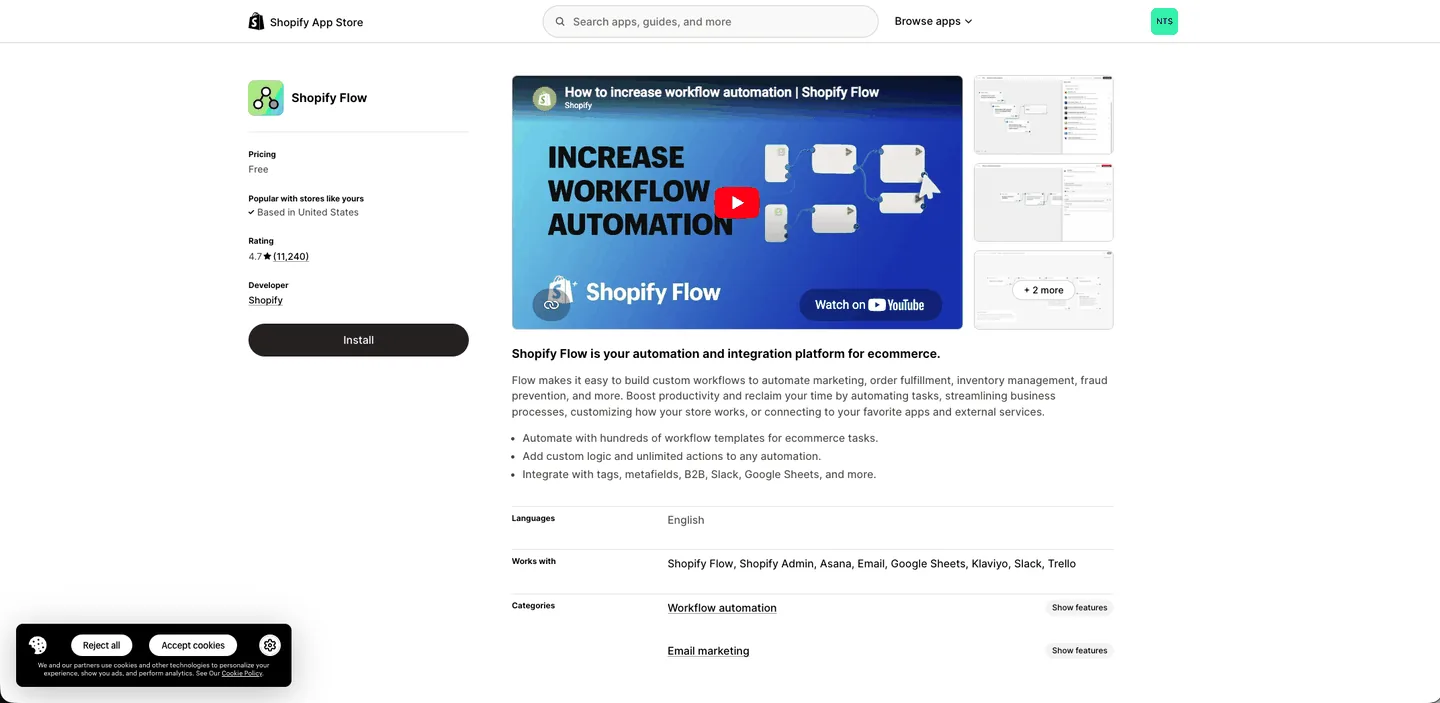
In your Shopify admin, open the App Store and install Shopify Flow, the free Shopify-built app that tells Wali the moment a cart is abandoned.
Search for Shopify Flow and click Install.
Now tell Shopify to trigger that flow whenever someone abandons a cart. Open the Shopify Flow app and:
1. Click Create workflow.
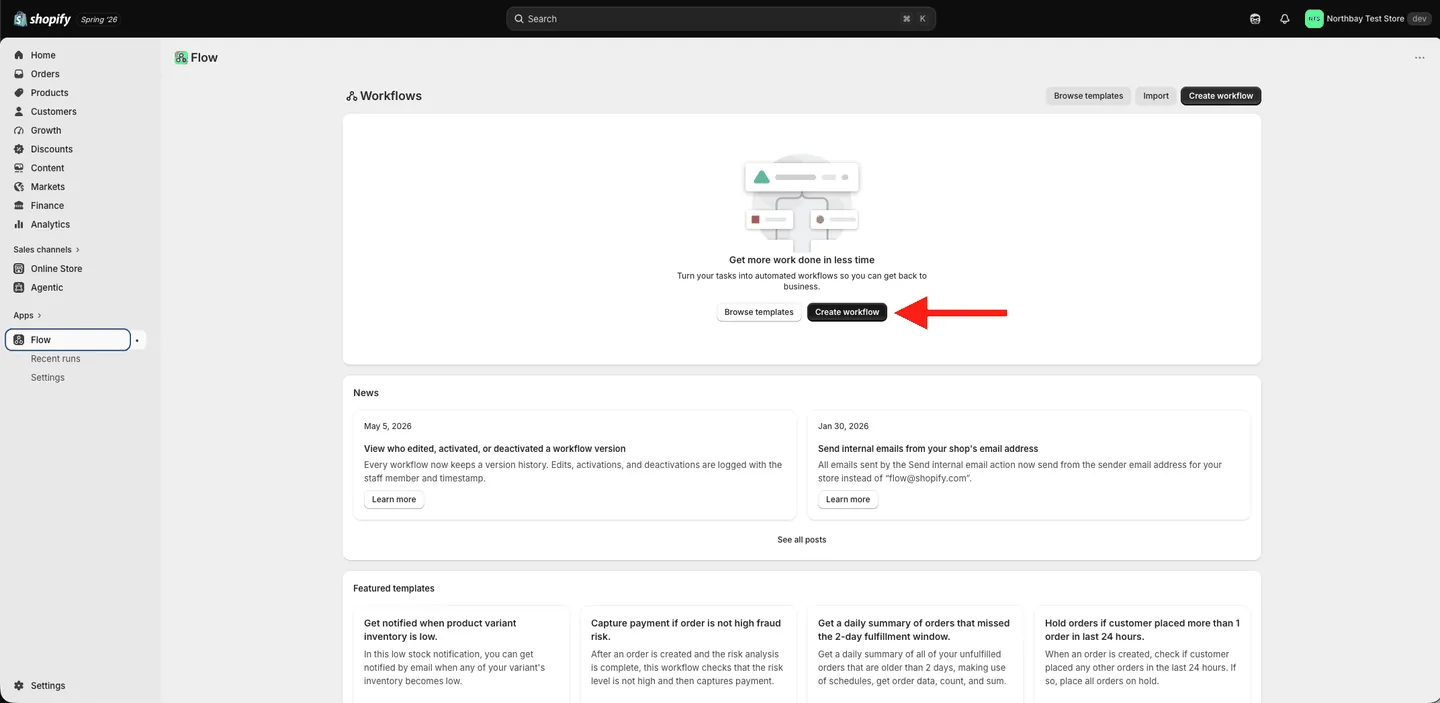
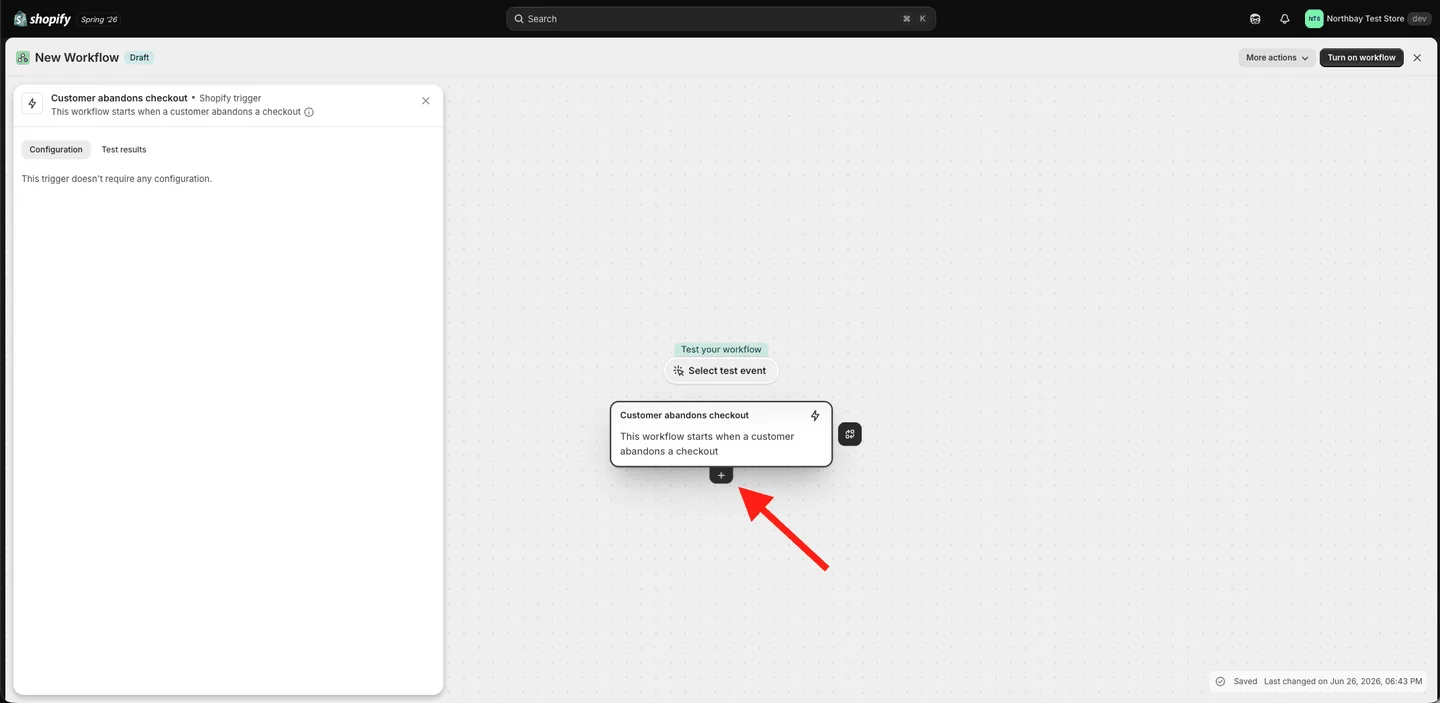
2. Click Add trigger, search abandons, and pick Customer abandons checkout. Then click the + below it.
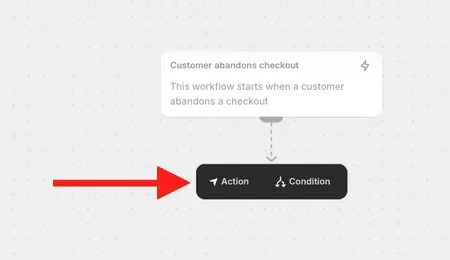
3. Choose Action.
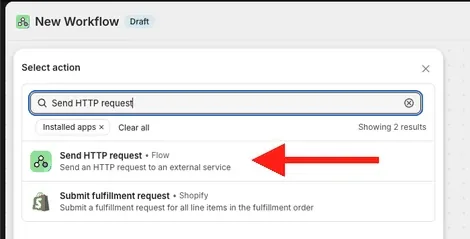
4. Search Send HTTP request and select it.
5. The request form opens empty.
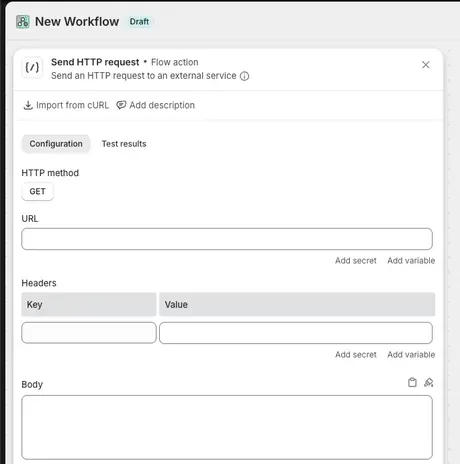
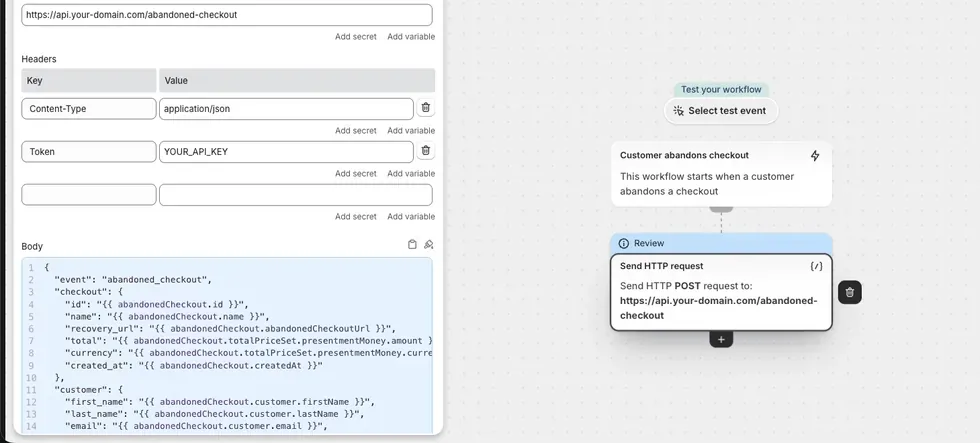
6. Fill in the request exactly as in the image below, setting each field as follows:
- Method:
POST - URL: the webhook URL from your Wali flow (the Abandoned cart node you copied earlier)
- Header
Content-Type→application/json - Header
Token→ your Wali API key - Body: paste the block below, then use Flow's Add variable button to fill in each value (you only need to match the field names, not read the whole thing):
{
  "event": "abandoned_checkout",
  "checkout": {
    "recovery_url": "{{ abandonedCheckout.abandonedCheckoutUrl }}",
    "total": "{{ abandonedCheckout.totalPriceSet.presentmentMoney.amount }}",
    "currency": "{{ abandonedCheckout.totalPriceSet.presentmentMoney.currencyCode }}"
  },
  "customer": {
    "first_name": "{{ abandonedCheckout.customer.firstName }}",
    "email": "{{ abandonedCheckout.customer.email }}",
    "phone": "{{ abandonedCheckout.customer.phone }}"
  },
  "line_items": [
    {% for lineItem in abandonedCheckout.lineItems %}
    { "title": "{{ lineItem.title }}", "quantity": {{ lineItem.quantity }} }{% unless forloop.last %},{% endunless %}
    {% endfor %}
  ]
}
Note: Shopify's Send HTTP request action is available on the Grow plan or higher.
Step 6 · Turn it on
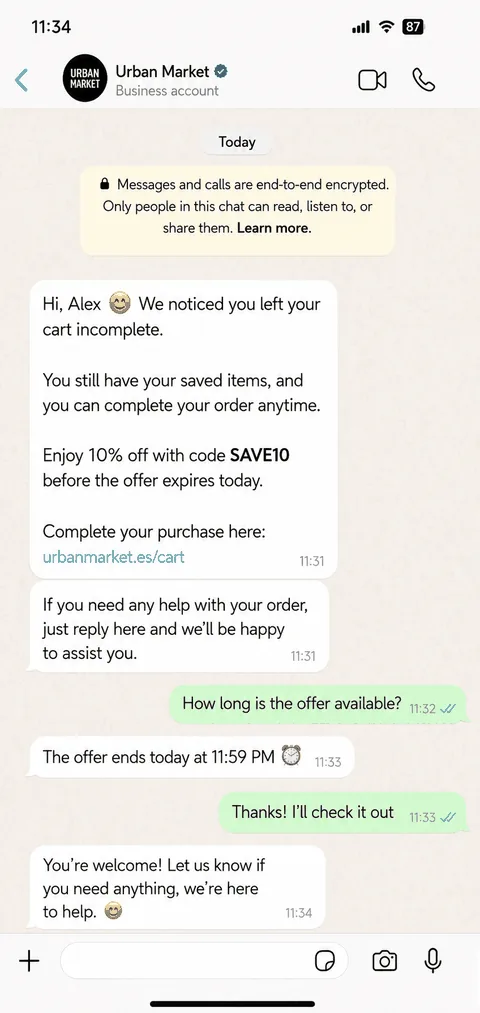
Click Turn on workflow and you're done. Every abandoned cart now triggers an automatic WhatsApp reminder. Here's what your customer sees:
No Shopify store yet? Start a free Shopify trial. You can set up your store and test this whole flow before committing to a paid plan.
A gentle reminder sequence
One message recovers some carts, though a short and respectful sequence recovers more, which is why the flow above already includes one. Always stop the moment the customer buys or replies STOP.
| When | Message |
|---|---|
| 1 hour after | Friendly reminder + link back to checkout |
| 24 hours later | Follow-up + a small coupon |
Frequently asked questions
Do I need a plugin to detect abandoned carts?
No. Shopify tracks abandoned checkouts natively on every plan. You're simply adding WhatsApp on top.
Do I need to know how to code?
No. The whole setup is clicking through Shopify Flow and Wali.
Which plans do I need?
Wali Business plan or higher (for flows). On Shopify, the Send HTTP request step needs the Grow plan or higher.
What if the customer didn't leave a phone number?
Then WhatsApp can't reach them, because Shopify only captures a phone number when the customer types one in. Those customers still get Shopify's own recovery email.
Resources
Ready to recover more sales?
Set this up once and it works while you sleep. Create your free Wali account and turn abandoned carts into completed orders.