
Flows · ready-to-adapt template
AI Agent Bot that understands Text, Audio, Image and Documents
The structure is prepared. Add your business data, connect the required accounts and test the result.
Flows available on Business and Enterprise. Configure and test before activating.
Inside the editor
A clear preview before you make it yours.
See the visual editor and the steps included in this template.
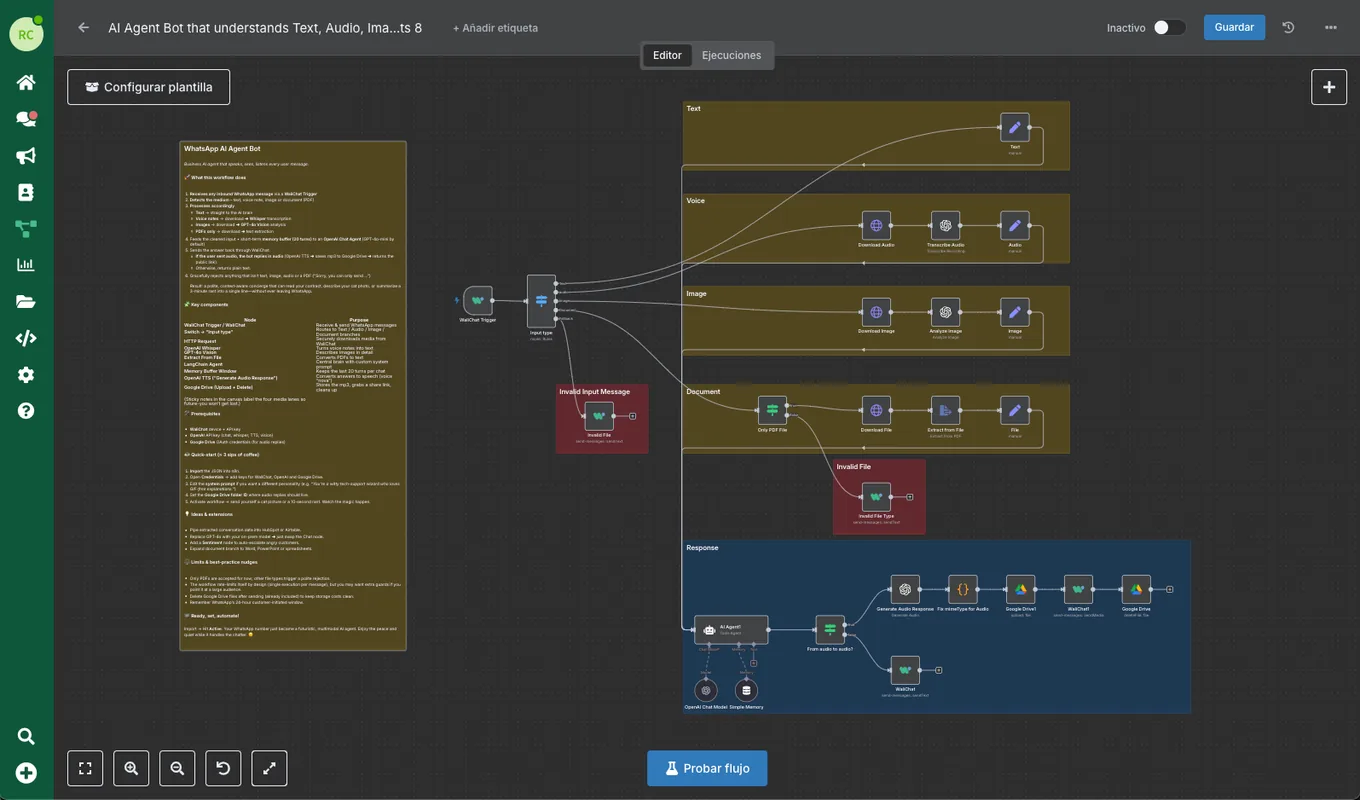
Steps in this flow
This template’s current steps. Your configuration may change what they do.
- Step 1Download Image
- Step 2Analyze Image
- Step 3Download Audio
- Step 4Transcribe Audio
- Step 5OpenAI Chat Model
- Step 6AI Agent1
- Step 7Download File
- Step 8Extract from File
- Step 9Simple Memory
- Step 10Only PDF File
- Step 11Fix mimeType for Audio
- Step 12Text
- Step 13Audio
- Step 14Image
- Step 15File
- Step 16Generate Audio Response
- Step 17From audio to audio?
- Step 18Input type
- Step 19WaliChat Trigger
- Step 20Invalid File
- Step 21Invalid File Type
- Step 22WaliChat
- Step 23WaliChat1
- Step 24Google Drive1
- Step 25Google Drive
A prepared structure. Your business rules.
Find this template by name in Flows. Import it into the editor, then complete and test its connections.
Choose the template
AI Agent Bot that understands Text, Audio, Image and Documents
Prepare its connections
Add the accounts, credentials and business data required by its nodes.
Test before activating
Try a representative case and check every output before using it with customers.
Before you start
- A plan with Flows available.
- External tools may require their own accounts, permissions and usage fees.
Before you start
Does registering activate this workflow?
No. After registering, find the template in Flows, complete its configuration and run a test before activating it.
Can I change or stop the workflow?
You can edit its nodes and deactivate it in the editor. Test again whenever you change instructions, connections or data.
What should I check in the AI replies?
Check the instructions, the data it can access and the conditions for involving a person. Test unclear questions and cases where information is missing.